
Players often search for a HeyCunt casino app, but there is no native download for Android or iOS. Instead, HeyCunt casino runs entirely in the mobile browser, and that browser version carries the full site - the pokies lobby, the AUD cashier, the daily check-in, the Promo tab and VIP rewards. This guide explains how to access HeyCunt casino on mobile, how to add it to your home screen, and how it performs.
HeyCunt casinoThe desktop and mobile layouts share the same five-tab design (Home, History, Promo, Live Chat, Setting), so nothing is lost by playing on a phone.
| Feature | Mobile browser details |
|---|---|
| Download required | No - runs entirely in the browser |
| iOS access | Safari, Chrome or Firefox - full support |
| Android access | Chrome, Firefox or any modern browser |
| Home-screen shortcut | Available on both iOS and Android |
| Pokies catalogue | Thousands of titles - identical to desktop |
| AUD deposits and withdrawals | Full cashier available on mobile |
| Bonus access | Promo tab, check-in and Lucky Draw all accessible |
| Live activity | Leaderboard and transaction feed on mobile |
| Login | Mobile number + password with SMS security |
| Security | SSL encryption - same as desktop |
| Updates | Automatic - nothing to install or patch |
Is there a HeyCunt casino app for Android or iOS?
No - there is no native app in the App Store or Google Play, and none is needed. The whole site is delivered through the browser, so you get the same pokies, the same AUD cashier and the same promotions without a download taking up storage. This also means there are no manual updates: the site is always the current version when you open it.
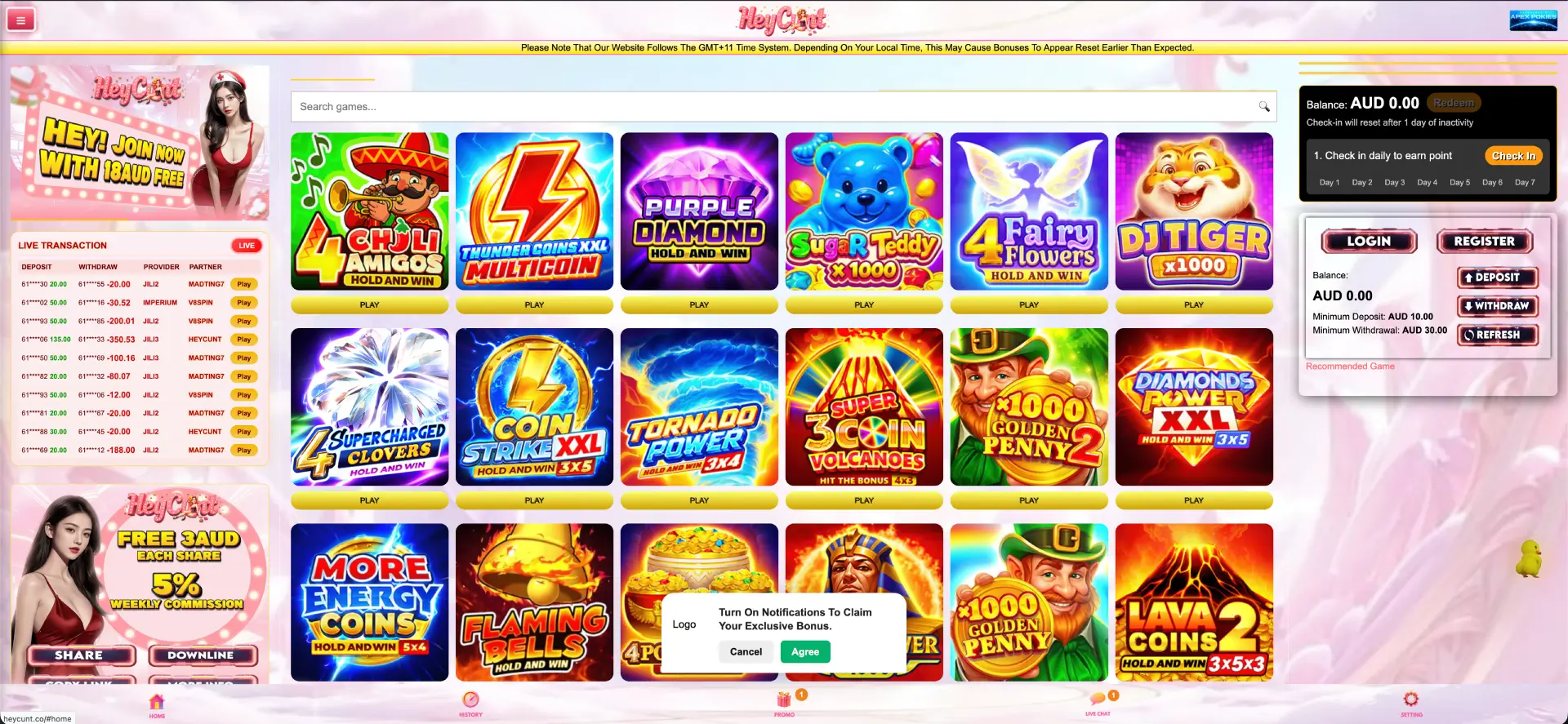
How to access HeyCunt casino on mobile
- Open your mobile browser (Safari on iOS, Chrome on Android).
- Go to heycuntaus.com.
- Tap Login to sign in, or Register to create an account with your mobile number.
- The pokies lobby loads directly, with the balance panel and Promo tab in reach.
How to add HeyCunt casino to your home screen
iOS instructions (Safari)
- Open heycuntaus.com in Safari on your iPhone or iPad.
- Tap the Share icon at the bottom of the screen (the square with an arrow pointing up).
- Scroll and tap Add to Home Screen .
- Confirm the name and tap Add.
- The icon appears on your home screen and opens the casino directly.
Android instructions (Chrome)
- Open heycuntaus.com in Chrome on your Android device.
- Tap the three-dot menu in the top-right corner.
- Tap Add to Home screen .
- Confirm the name and tap Add.
- The shortcut appears on your home screen for one-tap access.
Features available on mobile
- Pokies: the full Hold and Win catalogue from JILI, BNG, V8SPIN, Imperium and others.
- Cashier: AUD deposits from $10 and withdrawals from $30, with Redeem and Refresh.
- Bonuses: the Promo tab, daily check-in, red packets and Lucky Draw.
- Account: login, password reset and KYC uploads.
- Community: live leaderboard, transaction feed and the share programme.
Performance on mobile
- Lobby loading: the pokies grid loaded within a couple of seconds, with tiles rendering as you scroll.
- Pokies: Hold and Win titles opened without a separate install and ran with steady frame rates.
- Cashier: the AUD balance panel and Refresh control responded without a full page reload.
- Navigation: the five-tab bottom bar stayed fixed and responsive across screens in testing.
Mobile payments and withdrawals in AUD
The cashier is fully available on mobile. The minimum deposit is AUD 10 and the minimum withdrawal is AUD 30, both handled from the balance panel. Specific method limits and processing times appear inside the cashier when a method is selected; because those are not published on the lobby, confirm them at the point of deposit or withdrawal rather than relying on a fixed figure.
Security on the mobile version
The mobile site uses the same SSL encryption as desktop, with SMS verification tied to your registered number and KYC before withdrawals. Since nothing is installed, there is no separate app permission to manage - access stays inside the browser you already trust.
Usage tips for Australian players
- Add the home-screen shortcut so the site opens like an app without the download.
- Remember the site runs on GMT+11 - daily bonus timers may reset earlier or later than your local time.
- Keep your registered mobile number current so SMS codes and password resets work.
- Have KYC documents ready before your first AUD 30 withdrawal to avoid delays.
FAQ about HeyCunt Casino App
Is there a HeyCunt casino app to download?
No. HeyCunt casino runs entirely in the mobile browser - there is no native Android or iOS app.
How do I get HeyCunt casino on my phone?
Open heycuntaus.com in your mobile browser and, optionally, add it to your home screen for one-tap access.
Can I deposit and withdraw on mobile?
Yes. The full AUD cashier is on mobile - deposits from $10, withdrawals from $30.
Do I miss any features without an app?
No. The browser version carries the full pokies catalogue, bonuses, check-in, VIP rewards and live activity.
Is the mobile version secure?
Yes. It uses the same SSL encryption and SMS verification as desktop, with KYC before withdrawals.
Does the mobile site update itself?
Yes. Because it runs in the browser, it is always the current version with nothing to install or patch.